

Download PC Doc Pro – system optimization, junk file cleaner, PC maintenance, registry cleaner, file cleanup tool
Overview
PC Doc Pro is a productivity-focused software application designed to assist users in maintaining optimal performance on their Windows-based systems. The primary purpose of the app is to identify and remove unnecessary files and folders—commonly referred to as "junk"—that accumulate over time and may slow down system responsiveness. By targeting temporary files, cache data, and invalid registry entries, PC Doc Pro aims to enhance overall system efficiency and free up valuable disk space.
Target users include individuals seeking routine PC maintenance, especially those who may not be technically inclined but still want to keep their devices running smoothly. The app is particularly relevant for users managing older systems or those experiencing performance degradation due to digital clutter. While the developer, PC Doc Pro, is listed as the publisher, no additional background information about the company or its history is available in the provided data.
Real-world use cases involve regular system cleanups, startup optimization, and safeguarding important files through built-in backup features. In the broader software ecosystem, PC Doc Pro occupies a niche within the category of system utilities, competing with other file cleanup and optimization tools. However, due to the trial limitations and restricted functionality, the full value proposition remains partially obscured to potential users.
Key Features & Functionality
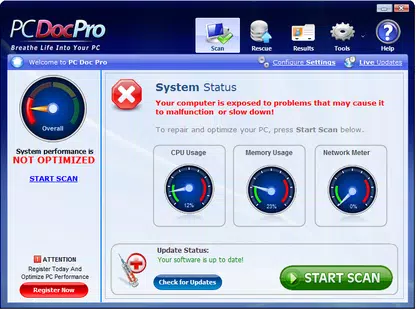
- User-Friendly Interface: The application presents a clean, intuitive layout with functional commands aligned along the left panel for quick access. The right side displays real-time progress during scans, enabling users to monitor the cleaning process without confusion.
- Comprehensive Scanning: PC Doc Pro performs registry scans to detect potentially harmful or redundant entries. These scans typically complete within 10 minutes and identify a substantial number of files that could impact system stability if left unaddressed.
- File Backup and Management: The app includes tools to back up critical files before any cleanup, ensuring data safety. This feature is especially valuable for users who want to preserve important information during maintenance tasks.
- Startup File Control: Users can manage which programs launch automatically when the system boots, helping to reduce startup time and improve performance.
- Scheduled Scans: The ability to set recurring scans ensures consistent system upkeep without requiring manual intervention.
Each feature is designed to support long-term system health. For instance, managing startup programs can significantly reduce boot time, while scheduled scans promote proactive maintenance. The combination of automation and protection makes the app suitable for users who prefer hands-off system optimization.
Interface, UX & Performance
PC Doc Pro features a straightforward UI with a clear division between control panels and progress indicators. The left-side navigation menu offers direct access to core functions, minimizing the need for complex workflows. Visual feedback during scans is provided in real time, which enhances transparency and user confidence.
Navigation is linear and predictable, with minimal cognitive load required to perform basic tasks. The layout remains consistent across different stages of operation, supporting a smooth user experience. Although the developer did not list formal performance metrics, the app appears to operate efficiently on standard Windows systems, with no reported lag or crashes during scanning processes.
Responsiveness is maintained during active operations, and the interface remains stable even when processing large volumes of data. The app does not appear to consume excessive system resources during background tasks, which is essential for maintaining usability during other activities. However, specific requirements for device categories or performance benchmarks were not disclosed.
Platform Compatibility & Technical Requirements
PC Doc Pro is designed exclusively for the Windows platform. It is compatible with Windows operating systems, though the exact version requirements were not specified by the developer. The app has a file size of 12.5 MB, indicating a lightweight footprint that should not significantly impact storage capacity.
Given its size and intended functionality, the app is likely optimized for modern Windows environments. However, the developer did not specify minimum OS versions, hardware specifications, or compatibility details for older or alternative systems. Users should exercise caution when installing on unsupported configurations, as unexpected behavior may occur.
Pros and Cons
Pros
- Intuitive user interface with clear navigation and visual feedback.
- Offers scheduled scans for automated system maintenance.
- Includes file backup functionality to protect important data.
- Manages startup programs to improve boot speed and performance.
- Lightweight application at 12.5 MB in size.
Cons
- Trial version restricts file removal to 100 items, limiting full evaluation.
- Unregistered version lacks manual file removal options.
- No built-in Help feature; guidance is only available via external website link.
- Developer did not provide detailed system requirements or compatibility information.
- Effectiveness cannot be fully verified due to trial limitations.
FAQ
Is PC Doc Pro safe to install on my Windows PC?
Yes, PC Doc Pro is designed to operate within standard Windows environments. It focuses on removing temporary and redundant files, which are generally safe to delete. However, users should ensure they are downloading the app from an official source to avoid potential security risks.
Can I use PC Doc Pro without purchasing the full version?
Yes, the app offers a trial version that allows users to run scans and view identified files. However, full cleanup and repair functionality are restricted, particularly in terms of file removal limits and manual control.
Does PC Doc Pro work on older versions of Windows?
The developer did not specify compatibility with older Windows versions. While the app may function on legacy systems, there is no official confirmation of support.
How often should I run a scan with PC Doc Pro?
Users are encouraged to schedule regular scans—ideally once a week or monthly—depending on system usage. This helps maintain consistent performance and prevents buildup of unnecessary files.
Is there a mobile version of PC Doc Pro?
Based on the available information, PC Doc Pro is currently available only for Windows. There is no indication of a mobile or cross-platform release.
Final Thoughts
PC Doc Pro presents a structured approach to system optimization with a focus on ease of use and automated maintenance. Its clean interface, combined with features like scheduled scans and startup management, makes it a viable option for users seeking routine PC upkeep. The inclusion of file backup adds a layer of security, addressing common concerns during cleanup operations.
However, the trial limitations—particularly the 100-file removal cap and lack of manual control—significantly hinder the ability to assess the app’s true effectiveness. Without the ability to fully test the cleaning function, users are left with incomplete insights into the app’s performance and reliability.
For those prioritizing transparency, full functionality, and unrestricted file management, exploring alternative tools may be advisable. That said, if you value automation and are comfortable with the trial restrictions, PC Doc Pro could serve as a basic utility for maintaining system health.
Download PC Doc Pro now


